
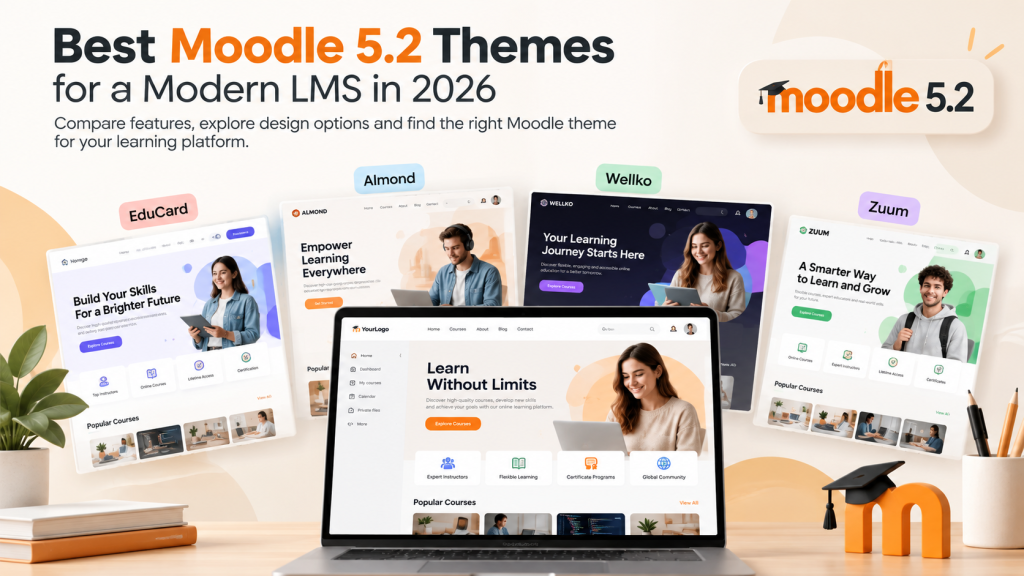
Moodle gives you plenty of control over how your learning platform works. But when it comes to how the site actually looks and feels, the theme you choose can make a surprisingly big difference.
A well-designed Moodle theme does more than change colors. It can make course discovery easier, give your homepage a clearer structure, improve the experience on smaller screens, and help your LMS feel like part of your organization rather than a separate piece of software.
With Moodle 5.2, you can continue using Moodle’s standard themes or install a compatible third-party theme when you need more control over the design.
So what should you actually look for in a Moodle 5.2 theme?
And when does it make sense to move beyond the default Moodle experience?
This guide breaks it down.
What Is a Moodle Theme?
A Moodle theme controls much of the visual presentation of your Moodle site.
That includes elements such as:
- colors
- typography
- page layouts
- navigation
- course presentation
- blocks
- the login experience
- the front page
- responsive behavior
Moodle 5.2 includes Boost and Classic as standard themes.
Boost is Moodle’s default theme and provides a clean foundation for most sites. Administrators can customize several elements from Moodle itself, including the brand color, background images, presets and additional SCSS.
For some organizations, that’s all they need.
Others want a more distinctive homepage, more ready-made content sections, greater branding control or a design that can be changed extensively without repeatedly editing CSS.
That’s where third-party Moodle themes become useful.
Do You Need a Premium Moodle Theme?
Not necessarily.
If you’re building a straightforward internal Moodle installation and visual branding isn’t particularly important, starting with Boost is perfectly reasonable.
A premium theme becomes more useful when your LMS is also part of the experience you’re presenting to students, customers, employees or the public.
For example, you may want:
- a more polished landing page
- reusable homepage sections
- stronger visual branding
- more control without custom development
- RTL language support
- multiple language support
- dark and light appearance options
- a responsive design across screen sizes
- ready-made layouts instead of building every section yourself
The important question isn’t simply whether a theme is free or premium.
It’s whether the theme reduces the amount of work required to create the Moodle experience you want.
What to Look for in a Moodle 5.2 Theme
Before choosing a theme based on a demo screenshot, look at the practical details behind it.
1. Moodle 5.2 Compatibility
This should be the first check.
A theme changes parts of Moodle’s interface, so compatibility with the Moodle version you’re running matters more than appearance alone.
If you’re upgrading an existing site, check theme compatibility before completing the upgrade rather than assuming an older version will work exactly as expected.
2. Responsive Design
Students rarely use an LMS from only one type of device.
Your theme should work comfortably on desktops, laptops, tablets and phones without turning navigation or course content into a struggle on smaller displays.
Responsive design should therefore be treated as a baseline requirement rather than a bonus feature.
3. Useful Customization
There’s an important difference between having lots of settings and having useful settings.
For most Moodle administrators, practical controls include:
- logo and branding options
- colors
- typography
- homepage sections
- navigation
- login page presentation
- block layouts
The best setup is one where common design changes can be handled through settings instead of requiring a developer every time.
4. A Flexible Front Page
Your Moodle front page is often the first thing a learner sees.
For public-facing learning platforms in particular, it may need to do much more than display a course list.
You might want sections for:
- featured courses
- course categories
- testimonials
- announcements
- instructors
- statistics
- calls to action
- information about your organization
A theme with configurable front-page sections can make this considerably easier.
5. Maintainability
It’s easy to focus entirely on how a theme looks today.
But Moodle sites evolve.
Courses change, Moodle is updated, branding gets refreshed and new pages are added.
A good theme should make ongoing administration manageable rather than forcing you to rebuild the design every time something changes.
Moodle 5.2 Themes from Almond Themes
All current Almond Themes listed below support Moodle 5.2.
They share several core ideas—including responsive design and customization—but they’re not identical. The better choice depends on how much control you want and what kind of Moodle site you’re building.
1. EduCard
EduCard is the strongest option in the collection when extensive visual customization is a priority.
It is designed around a dynamic front page and includes more than 50 ready-made blocks that can be configured for different homepage layouts.
It also includes the Special Page Plugin, which makes it possible to create additional pages containing content such as text, images, HTML and CSS.
Other notable features include:
- Moodle 5.2 compatibility
- responsive design
- 50+ pre-made blocks
- customizable front-page blocks
- Special Page Plugin
- extensive color options
- RTL support
- multilingual content support
- dark and light color schemes
Who is EduCard for?
EduCard makes the most sense for Moodle sites where presentation matters almost as much as course delivery.
That might include:
- schools and universities
- training companies
- commercial course platforms
- academies
- branded learning portals
It’s particularly useful if you want a highly customized front page without building the entire interface from scratch.
2. Almond
Almond is a flexible general-purpose Moodle theme aimed at organizations that want more control over Moodle’s appearance without moving away from the familiar Moodle structure.
It provides a dynamic front page, ready-made content blocks and branding options while remaining based around Moodle’s underlying layout.
Key features include:
- Moodle 5.2 compatibility
- responsive layout
- dynamic front page
- pre-made blocks
- Page Plugin
- color customization
- RTL support
- multilingual content support
Who is Almond for?
Almond is a good fit if you’re looking for an adaptable theme that can work across different types of Moodle installations.
Rather than targeting one very specific kind of institution, it can be configured for schools, training portals, corporate learning environments and independent course platforms.
3. Wellko
Wellko focuses on creating a modern Moodle front end with a large collection of ready-made sections.
It includes more than 40 pre-made blocks and multiple page and homepage layouts, giving administrators a starting point without requiring them to manually build every part of the site.
Features include:
- Moodle 5.2 compatibility
- fully responsive layout
- 40+ pre-made blocks
- multiple page layouts
- dynamic front page
- multilingual content support
- customization through theme settings
Who is Wellko for?
Wellko works particularly well for organizations that want to assemble a professional Moodle site quickly using pre-designed sections.
It can be a practical option for corporate learning platforms, training providers and organizations that want a modern-looking LMS without spending substantial time designing each component independently.
4. Zuum
Zuum is another flexible Moodle 5.2 theme built around a configurable front page.
Its blocks are organized into 16 different categories, which gives administrators a range of ways to structure the public-facing part of a Moodle site.
Key features include:
- Moodle 5.2 compatibility
- responsive design
- 100% dynamic front page
- blocks across 16 categories
- RTL support
- multilingual content support
- customizable layouts
Who is Zuum for?
Zuum is particularly useful when you want to create a content-rich Moodle homepage with different types of sections while keeping configuration inside the theme.
It can work well for educational organizations, online learning platforms and institutions that need multiple front-page content types.
Moodle Boost vs a Third-Party Theme
Moodle’s Boost theme shouldn’t be dismissed simply because it comes with Moodle.
Boost is the default Moodle theme and already supports useful customization options. In Moodle 5.2, administrators can work with presets, background images, a login-page background, brand color and additional SCSS.
For administrators comfortable with SCSS and Moodle customization, that provides a solid foundation.
The difference is largely about how much work you want to do yourself.
With Boost, creating a significantly different visual experience may involve presets, SCSS and additional configuration.
A feature-rich third-party theme can move more of that work into theme settings and ready-made components.
Think of it less as:
free theme vs paid theme
and more as:
build and customize the presentation yourself vs start with more of the presentation already built.
We’ll cover this in more detail in our Moodle Boost vs Premium Themes guide.
Which Moodle Theme Should You Choose?
There isn’t one theme that’s automatically right for every Moodle site.
Start with the way your LMS will actually be used.
Choose EduCard if…
You want extensive front-page customization, many ready-made blocks, additional custom pages and a high degree of visual control.
Choose Almond if…
You want a flexible all-purpose Moodle theme that can be adapted to different types of learning platforms.
Choose Wellko if…
You want to build a modern Moodle site quickly from a large collection of pre-made sections and layouts.
Choose Zuum if…
You want a dynamic homepage with a broad selection of configurable block categories.
If you’re still unsure, focus on the features you’ll genuinely use rather than choosing the theme with the longest feature list.
Before Installing a New Moodle Theme
Before changing the theme on a live Moodle site, a little preparation is worthwhile.
First, verify that the version you’re downloading explicitly supports your Moodle version.
If the site is already in production, test important changes in a staging or test environment whenever possible.
You should also consider:
- whether custom CSS from your current theme needs to be recreated
- whether third-party plugins affect page layouts
- how your current logo and brand assets will be used
- whether you’ve made theme-specific modifications
- how the site behaves at common mobile breakpoints
And remember that Moodle caches theme resources.
If you’ve changed theme settings and don’t immediately see the expected result, clearing the theme caches may solve the problem.
We’ll cover the complete process in our How to Install a Moodle Theme in Moodle 5.2 guide.
A Theme Should Improve Moodle, Not Get in Its Way
The most successful Moodle themes aren’t necessarily the ones with the most visual effects.
They’re the ones that make the learning platform easier to understand, easier to navigate and easier to maintain.
Start with the requirements of your learners and administrators. Then look for a theme that gives you the necessary design flexibility without making routine Moodle tasks more complicated.
Moodle 5.2 already gives administrators a capable foundation through Boost. If your project needs a more distinctive front page, additional layout options or greater branding flexibility, a compatible third-party theme can take that foundation much further.
You can explore all Moodle 5.2-compatible themes from Almond Themes and compare their features before deciding which approach fits your LMS.
